Image & idea generation
LumaSphere AI completes a photograph’s surroundings or creates a scene from a prompt. Choose 1.5K or 2K panoramas and draft, balanced, or high-detail quality.
ABOUT LUMASPHERE
LumaSphere turns images into environments you can explore, shape, and use. Under the glass, it treats every pixel as a direction—and every lighting choice as a change to that field.
FOLLOW A PIXEL INTO THE WORLD
Scroll to explore01 / FROM PIXEL TO SPHERE
A flat image becomes a field of directions. Longitude and latitude tell every pixel where its light belongs.
(u, v) → (θ, φ) → (x, y, z)Explore the mathematics Illustrative science walkthrough using a sample environment. Generated light is an estimate; a float32 export does not turn a photo into a measured HDR capture.
01THE TOOLKIT
From a reference image to a usable lighting environment, with room to inspect each step.
LumaSphere AI completes a photograph’s surroundings or creates a scene from a prompt. Choose 1.5K or 2K panoramas and draft, balanced, or high-detail quality.
Inspect a flat equirectangular panorama, look around an interactive 360° view, or use false-color luminance to see the distribution of brightness.
Change exposure and rotation for the whole environment. Name, tune, hide, or add individual light regions, with intensity and temperature controls.
Chrome, matte, and glossy spheres use Three.js image-based lighting. Prefiltered environment maps approximate how different surface roughness responds.
Inspect finite values, negative values, peak and average luminance, preview dynamic range, seam differences, and spherical coverage.
Observed, generated, and light-adjustment masks travel with your export. Model, prompt, assumed camera FOV, and calibration settings are documented.
Export RGBA float32 with lossless ZIP compression. The app reopens the file and checks every channel value before releasing the package.
A searchable library, autosaved controls, original source files, export history, and undo keep work close. Your account keeps your image allowance and studio access together.
02SPHERICAL PROJECTION
An equirectangular image unfolds the world around one viewpoint into a 2:1 rectangle. Horizontal position becomes longitude; vertical position becomes latitude.
u and v range from 0 to 1. Angles in these equations are radians.
A right-handed convention: +Y is up, zero azimuth points along +X, and positive azimuth turns toward +Z.
A normal camera image is projected through a pinhole model, using an assumed horizontal field of view. The image’s aspect ratio sets the vertical field of view. Only the rays within that camera view count as observed.
Photo generation accepts a 30°–110° horizontal FOV. Ordinary photo imports use 70°. Neither setting is an automatic camera calibration.
H/W is the original photo’s height-to-width ratio.
Unseen directions stay empty in ordinary imports. The separate generation flow fills those directions with clearly identified AI content.
03LINEAR LIGHT & CREATIVE CONTROL
Display images are encoded for screens. Light needs arithmetic that behaves like light. LumaSphere converts sRGB values into linear values before lighting edits.
FEEL WHAT A STOP DOES
1× lightLinear value: 0.180. One stop doubles or halves the amount of light.
+1 EV doubles light, +2 EV multiplies it by four, and −1 EV halves it.
These Rec.709 weights apply to linear RGB, not gamma-encoded display values.
For a normalized sRGB channel value C, the inverse transfer function is:
Clinear = C / 12.92   when C ≤ 0.04045
Clinear = ((C + 0.055) / 1.055)^2.4   otherwise
This undoes sRGB encoding. It cannot recover clipped highlights, reverse unknown camera tone mapping, or turn an ordinary photo into a measured HDR capture.
Generated scenes are analyzed for sky, clouds, sunlight, windows, lamps, glowing materials, and surrounding surfaces. Estimated polygons are refined by image color and brightness to exclude dark window frames. The resulting masks can contain holes and separate patches. Review their labels and boundaries: these are scene estimates, not precise measured segmentation. Imported HDRs retain the simpler brightness detector.
Automatic HDR lighting starts daytime sky near 3 and ordinary surfaces near 0.18 in relative linear luminance. Sources share a 1.5:1 direct-to-fill budget, evaluated facing each source. A visible sun uses a compact 0.53° core with rapid falloff; its peak follows its angular size and total energy. Regions remain editable, and the baseline values travel in regions.json.
Regional controls also follow editable ovals, rotated rectangles, polygons, or freehand outlines. Edge feathering blends the adjustment inward from the outline, so a window can be lit without boosting the wall around it. These masks wrap across the panorama seam and are baked into the exported radiance. Temperature uses an approximate Kelvin-to-RGB tint, neutral at 6500 K; it does not measure the spectrum of a real light.
Longitude repeats around the sphere. Rotation and light masks wrap across the left/right boundary so the edit does not stop at the edge of the rectangle.
The rotation is baked into exported pixels and recorded in the source metadata.
A bright pixel is only part of the story. Its angular size and the light arriving from other directions determine how strongly it lights a surface. Hard sun targets a 4:1 key-to-fill ratio; Focused lamp targets 2:1, evaluated on a surface facing the selected source. These are creative targets, not recovered measurements.
Focused emitters keep their total energy as you change diameter. A smaller disc concentrates that energy into fewer directions; a larger disc spreads it out. Intensity remains a separate control.
Ω is the spherical cap’s solid angle. New focused emitters remember the diameter at which intensity was set.
04AREA, ENERGY & CALIBRATION
A pixel near the equator covers more of the sphere than one near a pole. Simply averaging image pixels would over-weight the poles. Solid-angle weighting accounts for the area each pixel represents.
Equal steps in the image.
Unequal areas on the sphere.
W and H are panorama dimensions, y is a zero-based row index, and ΔΩ is in steradians.
All pixels together cover the full sphere. The same area weighting is used when reducing image resolution to preserve integrated light energy.
Each direction contributes luminance × spherical area × the cosine of its angle to the upward-facing receiver.
A horizontal illuminance reading at the capture point supplies one global scale factor.
Without an anchor, the app reports relative light values. With a measured lux reference, it scales Rec.709 luminance toward cd/m². This does not validate individual sources, distances, geometry, or colors. For a uniform luminance field, the continuous result is E = πL on a horizontal receiver.
05AI & PROVENANCE
A convincing environment can still contain invented geometry. LumaSphere keeps that distinction explicit instead of presenting every pixel as a measurement.
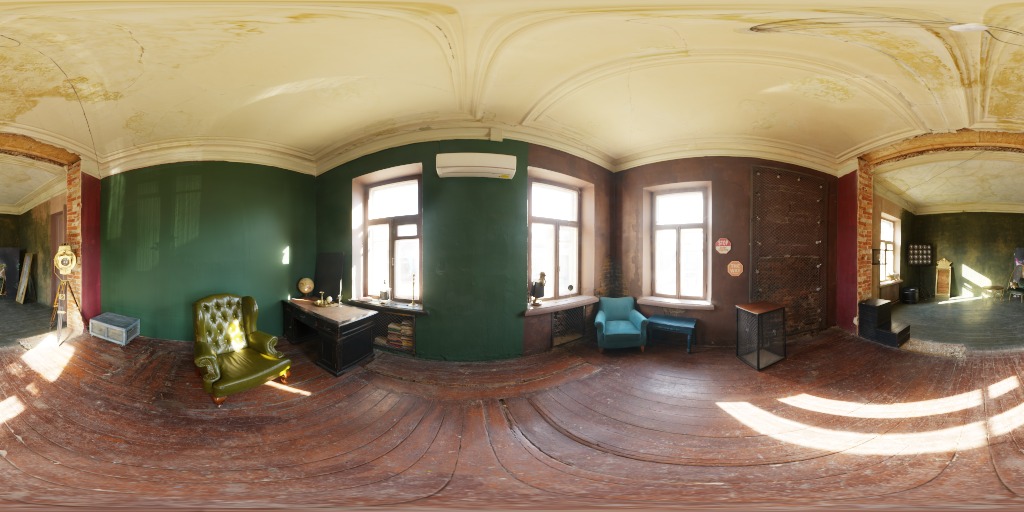
The server sends a projected reference image and alpha mask to LumaSphere AI. Because a model may change masked content, the app composites the observed projected pixels back over its response. Generated results are rejected if their dimensions do not match the requested panorama size.
Prompt-only generation has zero observed coverage. Photo-based generation reports observed coverage by solid angle, not just by counting image pixels.
LumaSphere AI returns a display-referred image. Its unseen geometry and lighting are estimates, and seams or inconsistent shapes can remain. Automatic HDR lighting reconstructs a plausible relative radiance field from labeled regions, then stores that field in EXR. This estimates lighting; it cannot recover the original scene’s missing measurements.
Measured HDR input keeps its original dynamic range. AI panoramas and ordinary images offer creative environment lighting with documented uncertainty.
06RENDERING & EXPORT
The screen preview and the exported master have different jobs. The preview is tone-mapped for viewing. The EXR keeps linear floating-point values for the next application.
RGBA channels. Lossless ZIP compression.
Linear sRGB / Rec.709.
environment.exrThe linear, float32 environment with edits baked in.
preview.jpgA tone-mapped image for viewing and sharing.
lights.jsonLight directions, extents, settings, and editable classifications.
provenance.jsonModel, prompt, camera assumptions, units, orientation, and validation.
masks/*.pngObserved, generated, and edited-light regions.
source/reference.*The original photo, when one was supplied and saved.
Three.js prefilters the environment for different surface roughness using PMREM. Chrome emphasizes reflections; matte materials reveal broad illumination; glossy materials show both. The preview has a fixed exposure so edits remain comparable.
Contact shadows are illustrative. This is not a ray-traced reconstruction of the original scene.
Preview dynamic range is log₂(peak / smallest positive luminance). Seam error compares the two horizontal edges, normalized by average luminance. These are useful diagnostics, not proof of geometric or photometric accuracy.
Working previews are at most 1K wide. Export uses the available original resolution; downsampling does not invent higher-resolution detail.
07A CLEARER PICTURE
LumaSphere combines generative imagery with a transparent lighting workflow. These boundaries help you use the result with the right expectations.
FURTHER READING & CREDITS
Mathematical descriptions reflect the app’s implementation. Starter environments are CC0 captures by Sergej Majboroda, Greg Zaal, and Andreas Mischok. The logo was supplied for LumaSphere.

YOUR NEXT HDRI STARTS HERE
Pick a photo. Build a world. Take the light with you.
Export your next environment as a 32-bit EXR.